A8068. Widget Library
编程题
普及/提高-
知识点
题目描述
The first line contains an integer $n$ — the number of instructions ( $1<=n<=100$ ). Next $n$ lines contain instructions in the language VasyaScript — one instruction per line. There is a list of possible instructions below.
- "Widget \[name\](\[x\],\[y\])" — create a new widget \[name\] of the type Widget possessing the width of \[x\] units and the height of \[y\] units.
- "HBox \[name\]" — create a new widget \[name\] of the type HBox.
- "VBox \[name\]" — create a new widget \[name\] of the type VBox.
- "\[name1\].pack(\[name2\])" — pack the widget \[name2\] in the widget \[name1\]. At that, the widget \[name1\] must be of type HBox or VBox.
- "\[name\].set\_border(\[x\])" — set for a widget \[name\] the border parameter to \[x\] units. The widget \[name\] must be of type HBox or VBox.
- "\[name\].set\_spacing(\[x\])" — set for a widget \[name\] the spacing parameter to \[x\] units. The widget \[name\] must be of type HBox or VBox.
All instructions are written without spaces at the beginning and at the end of the string. The words inside the instruction are separated by exactly one space. There are no spaces directly before the numbers and directly after them.
The case matters, for example, "wiDget x" is not a correct instruction. The case of the letters is correct in the input data.
All names of the widgets consist of lowercase Latin letters and has the length from $1$ to $10$ characters inclusive. The names of all widgets are pairwise different. All numbers in the script are integers from $0$ to $100$ inclusive
It is guaranteed that the above-given script is correct, that is that all the operations with the widgets take place after the widgets are created and no widget is packed in itself. It is guaranteed that the script creates at least one widget.
- "Widget \[name\](\[x\],\[y\])" — create a new widget \[name\] of the type Widget possessing the width of \[x\] units and the height of \[y\] units.
- "HBox \[name\]" — create a new widget \[name\] of the type HBox.
- "VBox \[name\]" — create a new widget \[name\] of the type VBox.
- "\[name1\].pack(\[name2\])" — pack the widget \[name2\] in the widget \[name1\]. At that, the widget \[name1\] must be of type HBox or VBox.
- "\[name\].set\_border(\[x\])" — set for a widget \[name\] the border parameter to \[x\] units. The widget \[name\] must be of type HBox or VBox.
- "\[name\].set\_spacing(\[x\])" — set for a widget \[name\] the spacing parameter to \[x\] units. The widget \[name\] must be of type HBox or VBox.
All instructions are written without spaces at the beginning and at the end of the string. The words inside the instruction are separated by exactly one space. There are no spaces directly before the numbers and directly after them.
The case matters, for example, "wiDget x" is not a correct instruction. The case of the letters is correct in the input data.
All names of the widgets consist of lowercase Latin letters and has the length from $1$ to $10$ characters inclusive. The names of all widgets are pairwise different. All numbers in the script are integers from $0$ to $100$ inclusive
It is guaranteed that the above-given script is correct, that is that all the operations with the widgets take place after the widgets are created and no widget is packed in itself. It is guaranteed that the script creates at least one widget.
输入格式
For each widget print on a single line its name, width and height, separated by spaces. The lines must be ordered lexicographically by a widget's name.
Please, do not use the %lld specificator to read or write 64-bit integers in C++. It is preferred to use cout stream (also you may use %I64d specificator)
Please, do not use the %lld specificator to read or write 64-bit integers in C++. It is preferred to use cout stream (also you may use %I64d specificator)
输出格式
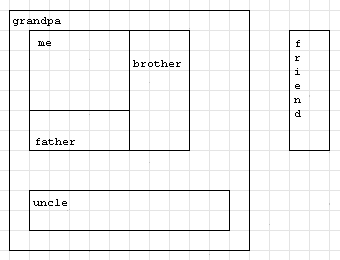
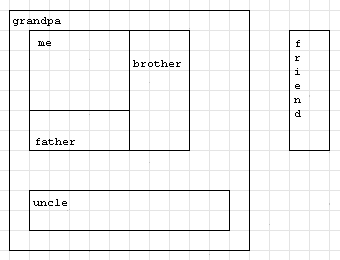
In the first sample the widgets are arranged as follows:

输入输出样例
输入 #1
12
Widget me(50,40)
VBox grandpa
HBox father
grandpa.pack(father)
father.pack(me)
grandpa.set_border(10)
grandpa.set_spacing(20)
Widget brother(30,60)
father.pack(brother)
Widget friend(20,60)
Widget uncle(100,20)
grandpa.pack(uncle)
输出 #1
brother 30 60
father 80 60
friend 20 60
grandpa 120 120
me 50 40
uncle 100 20
输入 #2
15
Widget pack(10,10)
HBox dummy
HBox x
VBox y
y.pack(dummy)
y.set_border(5)
y.set_spacing(55)
dummy.set_border(10)
dummy.set_spacing(20)
x.set_border(10)
x.set_spacing(10)
x.pack(pack)
x.pack(dummy)
x.pack(pack)
x.set_border(0)
输出 #2
dummy 0 0
pack 10 10
x 40 10
y 10 10
说明/提示
In the first sample the widgets are arranged as follows: