A8649 | Square
时间限制1s
内存限制256MB
通过 / 提交0/0
题目描述
There is a square painted on a piece of paper, the square's side equals $n$ meters. John Doe draws crosses on the square's perimeter. John paints the first cross in the lower left corner of the square. Then John moves along the square's perimeter in the clockwise direction (first upwards, then to the right, then downwards, then to the left and so on). Every time he walks $(n+1)$ meters, he draws a cross (see picture for clarifications).
John Doe stops only when the lower left corner of the square has two crosses. How many crosses will John draw?
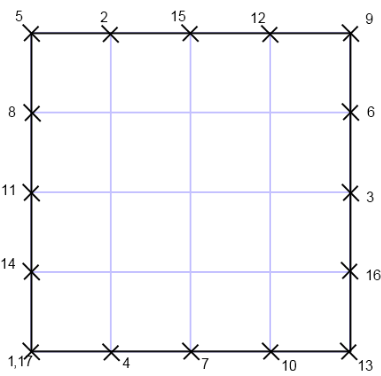 The figure shows the order in which John draws crosses for a square with side $4$ . The lower left square has two crosses. Overall John paints $17$ crosses.
John Doe stops only when the lower left corner of the square has two crosses. How many crosses will John draw?
 The figure shows the order in which John draws crosses for a square with side $4$ . The lower left square has two crosses. Overall John paints $17$ crosses.
输入格式
The first line contains integer $t$ ( $1<=t<=10^{4}$ ) — the number of test cases.
The second line contains $t$ space-separated integers $n_{i}$ ( $1<=n_{i}<=10^{9}$ ) — the sides of the square for each test sample.
The second line contains $t$ space-separated integers $n_{i}$ ( $1<=n_{i}<=10^{9}$ ) — the sides of the square for each test sample.
输出格式
For each test sample print on a single line the answer to it, that is, the number of crosses John will draw as he will move along the square of the corresponding size. Print the answers to the samples in the order in which the samples are given in the input.
Please do not use the %lld specifier to read or write 64-bit integers in С++. It is preferred to use the cin, cout streams or the %I64d specifier.
Please do not use the %lld specifier to read or write 64-bit integers in С++. It is preferred to use the cin, cout streams or the %I64d specifier.
输入输出样例
输入 #1
3
4 8 100
输出 #1
17
33
401
暂无题解
C++ 编辑器
输入
输出
可保存默认模板;新题优先使用已保存模板。
当前快捷键仅展示,暂不支持修改。
- 撤销
Ctrl / ⌘ + Z - 重做
Ctrl / ⌘ + Y - 查找
Ctrl / ⌘ + F - 全选
Ctrl / ⌘ + A - 复制
Ctrl / ⌘ + C - 剪切
Ctrl / ⌘ + X - 粘贴
Ctrl / ⌘ + V - 自动排版
工具栏排版按钮 - 草稿保存
编辑时自动保存到本机
历史
提交记录
状态说明时间源码
AI
作答助手
你好,我是作答助手。可以问思路、复杂度、样例含义或代码报错原因;不会直接给出完整 AC 代码。
确定要清空代码吗?
提交通过
评测结果:Accepted