A8530 | Good Matrix Elements
时间限制1s
内存限制256MB
通过 / 提交0/0
题目描述
The Smart Beaver from ABBYY got hooked on square matrices. Now he is busy studying an $n×n$ size matrix, where $n$ is odd. The Smart Beaver considers the following matrix elements good:
- Elements of the main diagonal.
- Elements of the secondary diagonal.
- Elements of the "middle" row — the row which has exactly  rows above it and the same number of rows below it.
- Elements of the "middle" column — the column that has exactly  columns to the left of it and the same number of columns to the right of it.
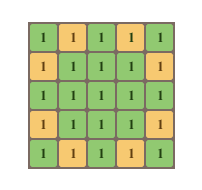 The figure shows a $5×5$ matrix. The good elements are marked with green. Help the Smart Beaver count the sum of good elements of the given matrix.
- Elements of the main diagonal.
- Elements of the secondary diagonal.
- Elements of the "middle" row — the row which has exactly  rows above it and the same number of rows below it.
- Elements of the "middle" column — the column that has exactly  columns to the left of it and the same number of columns to the right of it.
 The figure shows a $5×5$ matrix. The good elements are marked with green. Help the Smart Beaver count the sum of good elements of the given matrix.
输入格式
The first line of input data contains a single odd integer $n$ . Each of the next $n$ lines contains $n$ integers $a_{ij}$ $(0<=a_{ij}<=100)$ separated by single spaces — the elements of the given matrix.
The input limitations for getting 30 points are:
- $1<=n<=5$
The input limitations for getting 100 points are:
- $1<=n<=101$
The input limitations for getting 30 points are:
- $1<=n<=5$
The input limitations for getting 100 points are:
- $1<=n<=101$
输出格式
Print a single integer — the sum of good matrix elements.
输入输出样例
输入 #1
3
1 2 3
4 5 6
7 8 9
输出 #1
45
输入 #2
5
1 1 1 1 1
1 1 1 1 1
1 1 1 1 1
1 1 1 1 1
1 1 1 1 1
输出 #2
17
In the first sample all matrix elements will be good. Good elements in the second sample are shown on the figure.
C++ 编辑器
输入
输出
可保存默认模板;新题优先使用已保存模板。
当前快捷键仅展示,暂不支持修改。
- 撤销
Ctrl / ⌘ + Z - 重做
Ctrl / ⌘ + Y - 查找
Ctrl / ⌘ + F - 全选
Ctrl / ⌘ + A - 复制
Ctrl / ⌘ + C - 剪切
Ctrl / ⌘ + X - 粘贴
Ctrl / ⌘ + V - 自动排版
工具栏排版按钮 - 草稿保存
编辑时自动保存到本机
历史
提交记录
状态说明时间源码
AI
作答助手
你好,我是作答助手。可以问思路、复杂度、样例含义或代码报错原因;不会直接给出完整 AC 代码。
确定要清空代码吗?
提交通过
评测结果:Accepted